D&S Warehouse Boston 3PLMalden, MA
Whatnot Fulfillment

Whatnot fulfillmentAfter the show, every order packed right

D&S runs its own Whatnot shows every week, and we sort, check and label every show with software we built ourselves. Hand the shipping to us, or run the same system in your own space (coming soon).

  • 1scan

    Scan an item; the screen and a voice tell you which slot

  • 4×6sort wall

    24 slots by default, sized to your shelf

  • 2ways

    Let D&S ship for you, or run the system yourself

  • 3languages

    Chinese, English and Spanish screens and voice

How it works

The risky part is packing the wrong box

One show can mean dozens of packages. Buyers often win several items, and Buy It Now orders from your shop land in the same batch. Matching items to orders by hand is where items go into the wrong box or get left out. The system decides where each item goes and whether a box is complete; your team just scans and packs.

  1. Import the showExport the order sheet and the label PDF for the show from Whatnot and drop them in.
  2. Scan, then sortScan the number sticker on an item; its slot lights up and a voice calls the number.
  3. Check before sealingScan each package again. A wrong item turns the screen red and calls it out; the box can be sealed only when it's complete.
  4. Labels print themselvesWhen a package passes the check, its shipping label and packing slip print automatically.
Two ways

Two ways to use it

Whatnot sellers

Let D&S ship for you

Keep your stock at our warehouse in Malden, MA. You run the show; afterwards we sort, scan-check and pack every order and ship it on the Whatnot label, Buy It Now orders included. Slow-moving stock can go on consignment through our own Whatnot shows, or we can buy it outright.

Ask about fulfillment
Sellers and warehouses that ship themselves

Run the system yourself (coming soon)

It's the same system our warehouse uses every day. You need a Windows PC, a 2 × 1 label printer, a 4 × 6 label printer and a scanner. Join the list now and we'll contact you as soon as it opens.

Join the waitlist
Features

Built for packing after a live show

Every feature comes from packing our own shows.

Print number stickers in the browser

Pick a number range before the show. The big number on each 2 × 1 sticker is easy to read on camera, and stickers left over from one show work in the next.

Scan an item, see its slot

Packages are mapped to slots on a sort wall. Each scan lights a slot and a voice calls the number.

Check every package before sealing

Scan each package again. A wrong item means a red screen, a vibration and a voice alert; only a complete package can be sealed.

Labels print after the check

The 4 × 6 shipping label and the Whatnot packing slip for that package print automatically, with no print dialog.

No more handwritten Buy It Now notes

Shop purchases have no item number. The system lists them and prints a BIN sticker for each, so they get scanned like everything else.

Problem orders are set aside

Failed payments and cancelled orders stay out of your boxes. An item that failed and then sold is put back into its package.

Several packages per buyer, kept apart

Sorting follows Whatnot's packages, so one buyer's separate packages never end up in the same box.

Three languages

Chinese, English and Spanish screens and voice, so anyone on your team can pick it up.

Stickers

Number stickers: big numbers for the host, barcodes for the scanner

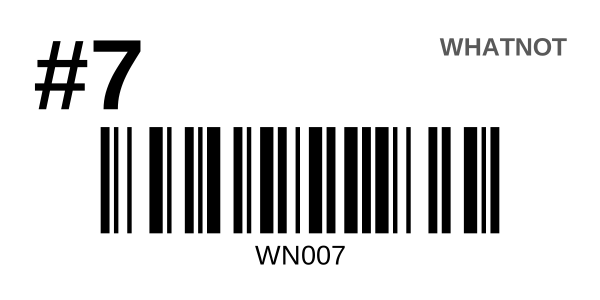
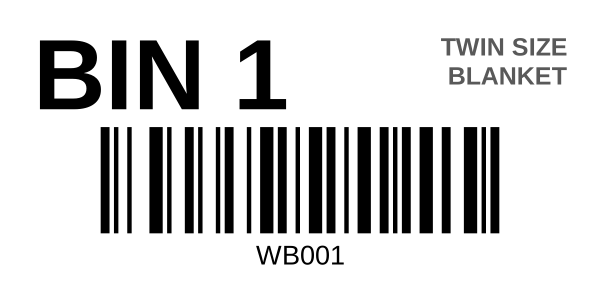
The number matches the # in the Whatnot item title, and the barcode content is printed underneath, so it can be typed in if a scan fails. Buy It Now stickers carry the item name, so the right item gets picked. Existing stickers with a letter prefix (such as SW007) still work; only the number counts.

Number sticker sample: big #7, barcode WN007Buy It Now sticker sample: BIN 1 with the item name top right, barcode WB001
Sticker samples · 2 × 1 inch
Works with Whatnot

You don't hand us your Whatnot account

The system reads only the order sheet and label PDF you export from Whatnot. It needs no Whatnot password and never acts on Whatnot for you: no label purchases, no order changes, no messages.

Buyer data

Buyer information stays on your computer

  • Buyer names and addresses in your orders are stored only on your own computer, never uploaded to our servers
  • Each show's data is deleted automatically 30 days after import, or whenever you clear it
  • Our servers keep only account and license information
  • See our privacy policy
What you need

To run the system yourself

  • A Windows 10 or 11 PC
  • A 2 × 1 inch label printer (number stickers)
  • A 4 × 6 inch shipping label printer
  • A USB scanner that reads 1D barcodes
  • Your Whatnot seller account (to export orders and labels)

Macs and tablets can sign in to view and import, but not print. If D&S ships for you, you need none of this.

FAQ

Questions

Can I use the system now?

Our own warehouse uses it every day. The version for other sellers is in the works; join the list and we'll contact you as soon as it opens.

Do I need to give you my Whatnot login?

No. The system reads only the order sheet and label PDF you export from Whatnot. It never signs in to your Whatnot account or acts on it.

Will my current number stickers work?

Yes, as long as the barcode contains the number; SW007, for example, counts as #7. If you don't use stickers, the system prints them for you.

How are Buy It Now orders handled?

After import, the system lists the show's Buy It Now items. Print a BIN sticker for each, put it on the item, and it's sorted and checked like everything else.

If you ship for me, how does my stock get to you?

Ship it to our Malden warehouse, and before each show tell us what you'll sell. Contact us and we'll work out the details for your setup.

How much does it cost?

Fulfillment is quoted on your volume and the type of goods. Pricing for the system will be announced when it opens. Send us an inquiry, call, or message us on WeChat.

Are you affiliated with Whatnot?

No. D&S is a seller on Whatnot. We built this system ourselves; it is not an official Whatnot product. Whatnot is a trademark of Whatnot Inc.


Get in touch

Fulfillment or the system, let's talk

On the inquiry form, check “Whatnot fulfillment” and add “fulfillment” or “system waitlist” in the notes. Or just call us or message us on WeChat.

D&S WeChat QR code